How to combine many CSV files into one Excel file (Mac, Windows, Linux — no code)
Stack monthly exports into one spreadsheet, convert CSV to Excel and remove duplicate rows — offline, even with millions of rows.
Free · no account · 3 free uses of every tool · also for Mac (Intel), Windows, Linux
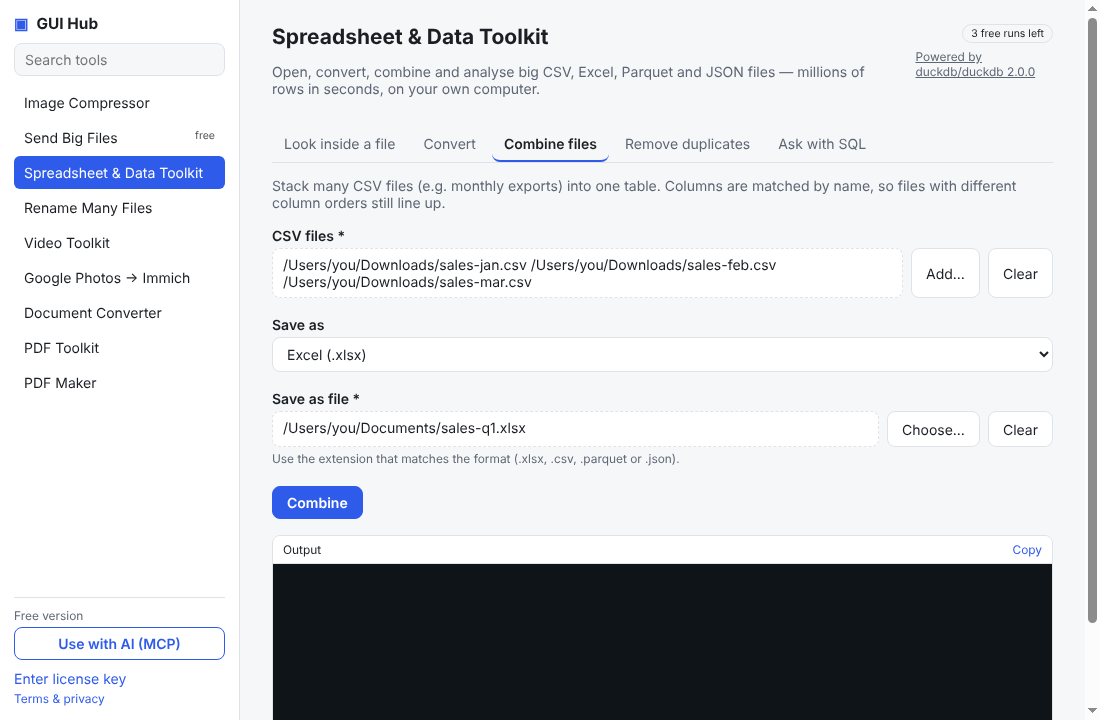
Monthly exports, one CSV per store, files that are too big for Excel to open: combining them by copy-and-paste is slow and error-prone, and online converters mean uploading your data. These steps do it on your own computer in seconds.
Combine CSV files
- Open GUI Hub and choose Spreadsheet & Data Toolkit.
- On Combine files, add all the CSV files.
- Choose Excel (.xlsx) (or CSV) and where to save, then press Combine.
Columns are matched by name, so files with columns in a different order — or with an extra column — still line up. Missing values stay empty.
Convert CSV to Excel, or Excel to CSV
Use the Convert tab. It also reads and writes Parquet and JSON.
Remove duplicate rows
The Remove duplicates tab saves a copy without exact duplicate rows.
Files too big for Excel?
Excel stops at about one million rows. Look inside a file shows the columns, the first rows and statistics of any size of file, and Ask with SQL (or your AI) can filter and total it before you save a smaller Excel file.
What powers it
DuckDB (MIT), a fast open-source analytics engine. Everything runs locally.
Try it now
Free download — use it 3 times free. $9 once unlocks everything. Prefer to ask your AI? GUI Hub also works as an MCP server for Claude, Cursor and others.