Let your AI do real work on your files.
Ask Claude or Cursor to compress a video, make a Word, PowerPoint or PDF file, shrink photos or merge PDFs — and it actually happens, on your computer.
Each GUI Hub product bundles trusted open-source programs into one app and one AI connection. Try every tool free.
Video, photos, Word/PowerPoint/PDF files, renaming and sending — for you and your AI.
Open, convert, combine and analyse CSV, Excel, Parquet and JSON files — for you and your AI.
Every product above and every product we add later — one license.
$19 once · best valueGet All-AccessChat assistants can write the text or the command — but they can’t save a real file or run a video converter on your computer. GUI Hub gives them that, with programs millions of people already trust.
Compress, convert to MP4, MP3, GIF, trim
“Shrink party.mov so it fits on Discord.”Powered by FFmpeg · Details
Create .docx/.pptx, convert Word ↔ Markdown
“Turn these notes into a Word document on my Desktop.”Powered by Pandoc · Details
Invoices, letters, reports, CVs
“Write my March invoice to Acme as a PDF.”Powered by Typst · Details
Merge, split, compress, rotate, watermark, protect
“Merge the three PDFs in Downloads and add a password.”Powered by pdfcpu · Details
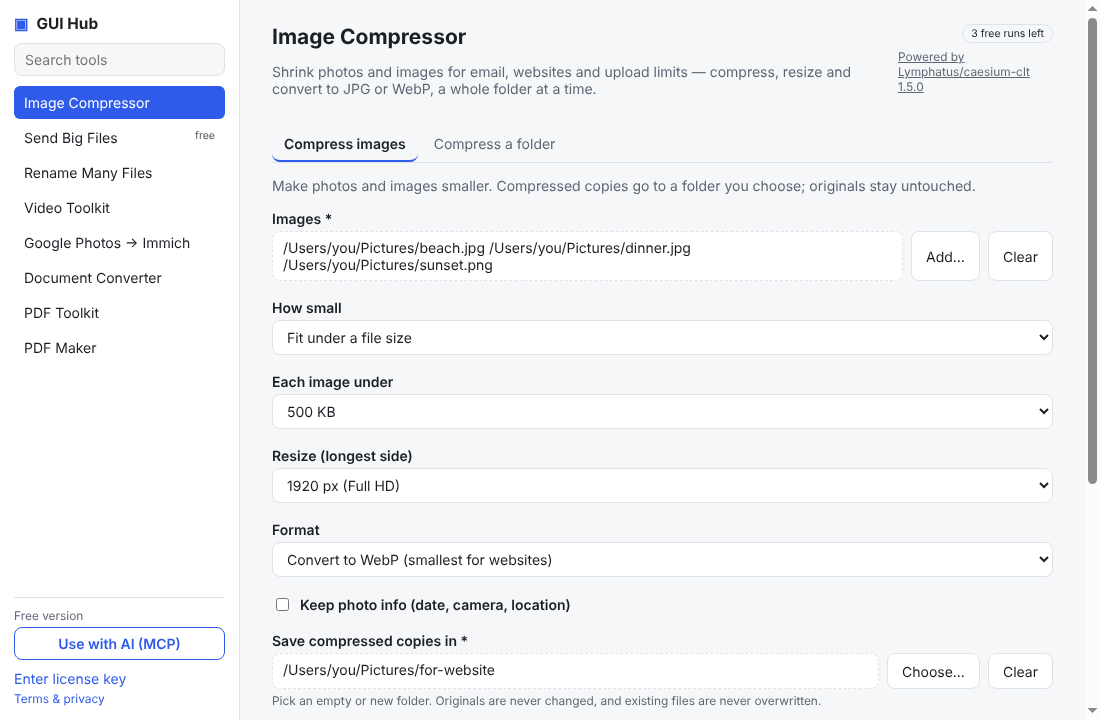
Compress, resize, convert to JPG or WebP
“Resize my trip photos to 1920 px, each under 500 KB.”Powered by Caesium · Details
Bulk rename with preview; send big files
“Rename these photos to trip-001, trip-002…”Powered by F2 · Details
Open, convert, combine, de-duplicate and query CSV & Excel
“Which region sold the most in sales-2025.xlsx?”Powered by DuckDB · Details
Your assistant picks the right tool, fills in the details and tells you when the file is ready.
Illustration. Tool names are exactly what GUI Hub provides.
Pick a file, choose plain-language options, press one button. Great for anyone who doesn’t use AI.

Files are processed on your computer and never uploaded. No account, no tracking.
FFmpeg, Typst, Pandoc and DuckDB and more — official releases, checked by SHA-256 before first use.
One install gives your AI 29 tools. No Python, no config files, no separate server per tool. New tools arrive automatically.
Free to try — every tool works 3 times before you decide.
Download the one-file extension, double-click it, press Install. Done — ask Claude for a file job.
Download gui-hub.mcpbAdd an MCP server with this command (needs Node.js 18+):
npx -y github:MuttyRab/MuttyRab.github.io
Claude Code:
claude mcp add gui-hub -- npx -y github:MuttyRab/MuttyRab.github.io
Point-and-click forms for every tool, plus a Use with AI button that connects Claude Desktop or Cursor for you.
Download for WindowsNew independent apps get this one-time caution. The full source is public on GitHub.
Try everything free. Each product is $9 once, or $19 once for all of them — no subscription.
Every tool works 3 times free first. Secure checkout by Polar; your license key arrives by email — paste it into the app, or just give it to your AI. 30-day refunds.
It lets your AI assistant (or you, in a simple app) run 9 trusted open-source programs on your own computer: image compressor (Caesium), send big files (croc), spreadsheet & data toolkit (DuckDB), rename many files (F2), video toolkit (FFmpeg), google photos → immich (immich-go), document converter (Pandoc), pdf toolkit (pdfcpu), pdf maker (Typst). Ask in plain words; the file appears where you asked.
Any app that supports MCP, the standard way AI assistants use tools: Claude Desktop, Claude Code, Cursor, VS Code (Copilot agent mode), Windsurf and others.
No. Everything runs on your computer. There is no account and no tracking. Only tools whose job is the network (sending a file, uploading to your own Immich server) use it.
Every tool works fully 3 times on each computer — through your AI or in the app — and Send Big Files is free forever. When you run out, your AI tells you; $9 once unlocks that product, or $19 once for every product.
No. Each product is $9 once, yours to keep, including tools added to it later. If it is not for you, email within 30 days for a full refund.
You can — they are credited on every page. GUI Hub saves you learning their options, installs and verifies them for you, and connects them to your AI with one click instead of config files.