How to bulk rename hundreds of files safely — with a preview and undo
Rename photos, documents or music in bulk with find-and-replace and numbering, see every change before it happens, and undo with one click.
Free · no account · 3 free uses of every tool · also for Mac (Intel), Windows, Linux
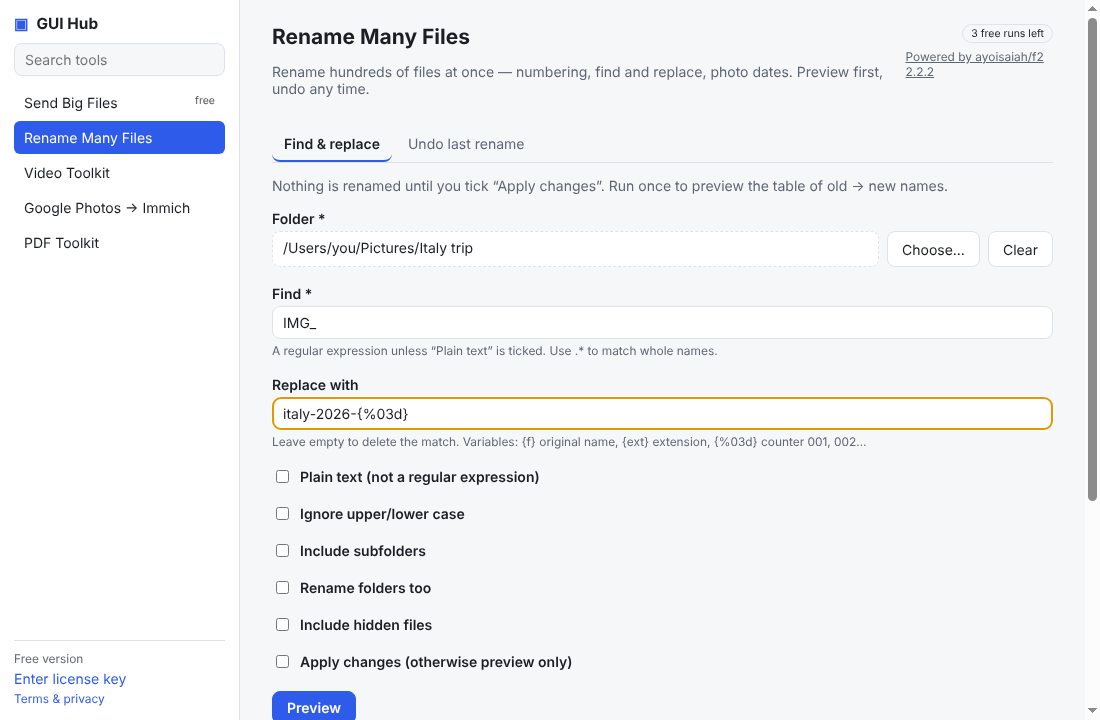
Renaming files one by one is slow, and many batch renamers change files immediately — one wrong pattern and hundreds of names are scrambled. A safer workflow is: preview, apply, and keep an undo.
Rename with find and replace
- Open GUI Hub and choose Rename Many Files.
- Pick the folder.
- Type what to find (for example
IMG_) and what to replace it with (for exampleholiday-). - Press Preview. A table shows every old name next to its new name. Nothing has changed yet.
- Happy? Tick Apply changes and run again.
Number files in order
Use {%03d} in the replacement to add 001, 002, 003… and {ext} to keep each file’s extension. Example: find .*, replace with trip-{%03d}{ext}.
Undo a mistake
The Undo last rename tab restores the previous names in that folder.
What powers it
F2, a fast open-source renaming tool (MIT). GUI Hub downloads the official release and runs it for you.
Try it now
Free download — use it 3 times free. $9 once unlocks everything. Prefer to ask your AI? GUI Hub also works as an MCP server for Claude, Cursor and others.